

Remove glare from glasses in a photo

To remove glare from glasses in a photo, upload the photo to the editor below and send the ready-made prompt: "Remove the glare from the glasses. Keep the person and his eyes looking the same." ImgPilot's AI image editor redraws the lenses without the reflection, so the eyes show through again. This works best on portraits and headshots where the eyes are still partly visible behind the glare.

  • Prompt already written
  • Portraits and headshots
  • Credit cost shown before you send
  • Starter credits for new accounts
  • Updated November 9, 2026

Remove glare from glasses

The prompt is ready. For a woman in the photo, change "his eyes" to "her eyes".

Model

Need several reference images or side-by-side models? Open the AI image editor

What does AI glare removal look like?

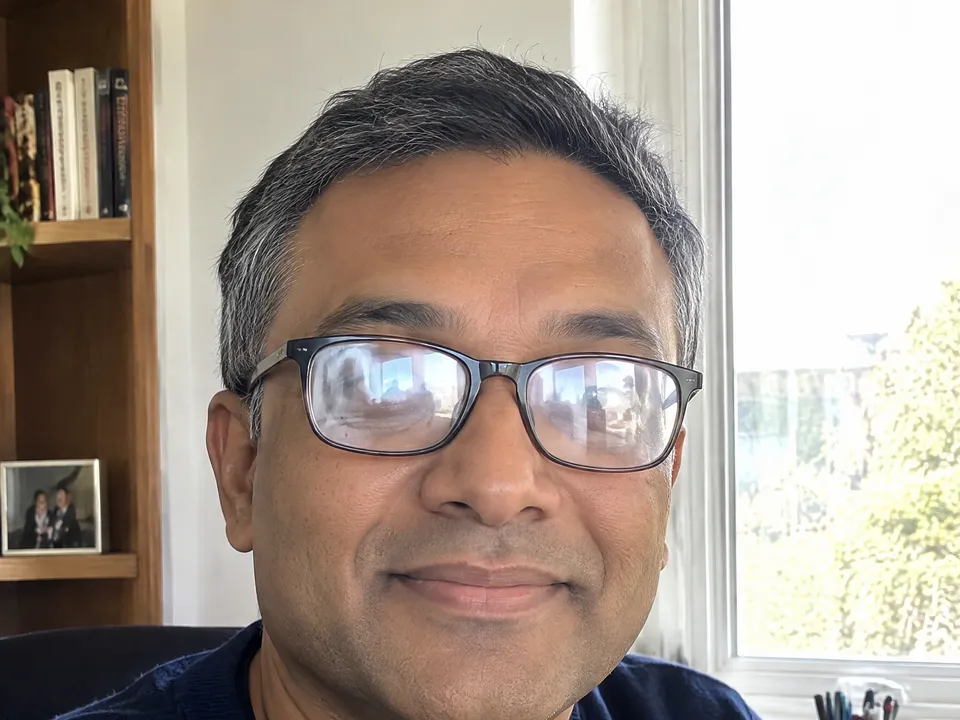
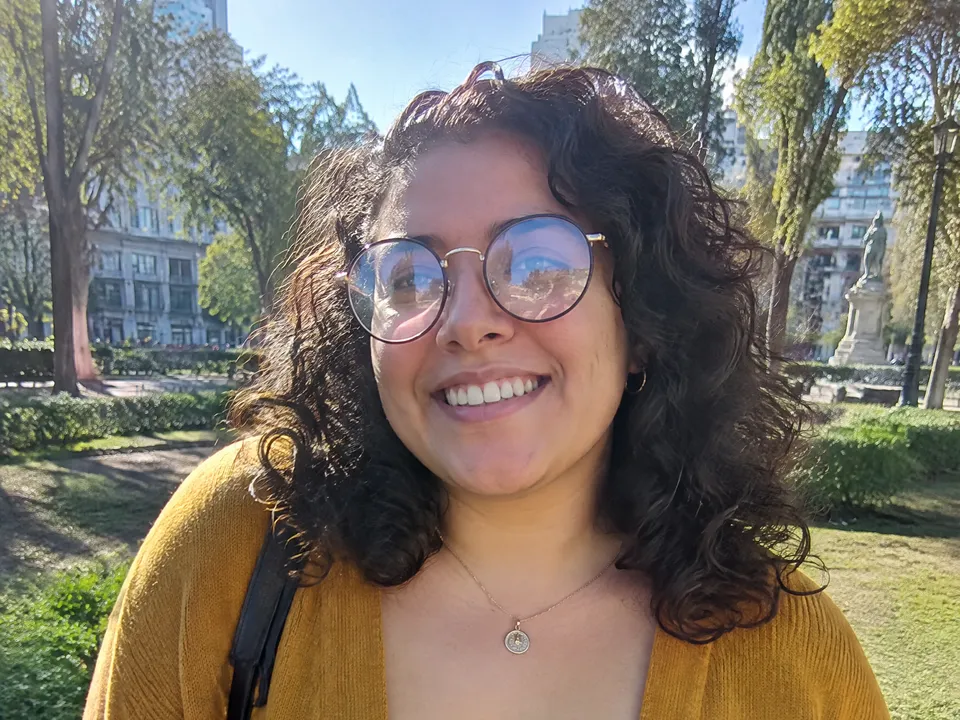
Each before/after pair below is one unretouched run of GPT Image 2.5 · Sunburst, the default model in ImgPilot's AI image editor, with the prompt under it. The people in these photos are AI-generated.

  • Window reflections on a headshot

    When to use: a work photo or profile picture taken next to a bright window or screen.

    A man in glasses at a desk with white window reflections covering both lenses
    Before
    The same man with clear lenses and his eyes visible
    After

    Remove the glare from the glasses. Keep the person and his eyes looking the same.

  • Sky glare on an outdoor portrait

    When to use: a photo taken outside where the lenses reflect the sky or the sun.

    A woman in round glasses in a park with sky reflections on the lenses
    Before
    The same woman with clear lenses and her eyes visible
    After

    Remove the glare from the glasses. Keep the person and her eyes looking the same.

Step by step

  1. Add the photo

    Click "Choose image", or drop or paste the photo into the editor at the top of this page. It takes JPG, PNG or WebP files up to 10 MB. You need an ImgPilot account to upload and edit.

  2. Keep or adjust the prompt

    The prompt "Remove the glare from the glasses. Keep the person and his eyes looking the same." is already filled in. Change "his" to "her" if needed. Keep the part about the eyes: it tells the AI image model not to change the person.

  3. Check the cost and send

    The credit cost is shown on the "Remove glare" button before you press it. The default model is GPT Image 2.5 · Sunburst. One glare edit usually takes one to two minutes; the two examples on this page took 71 and 88 seconds.

  4. Compare and download

    Drag the slider on the result to compare before and after. Look closely at the eyes, then click "Download". To fix something else, click "Edit this result" and type the next change.

Which photos work best for removing glare from glasses?

  • Works well: portraits, headshots and selfies where the eyes are still partly visible through the reflection.
  • Works less well: lenses that are fully white or mirrored. The eyes are completely hidden there, so the AI image model has to draw them, and they may not look like the real person.
  • Use another approach: for an ID or passport photo, retake the photo without glare. Official photos must show the real person, and ImgPilot does not allow editing ID documents.

Why do the eyes look different after removing the glare?

  • The eyes changed shape or color. Keep "keep the person and his eyes looking the same" in the prompt, then run the edit again. Each run gives a slightly different result.
  • Some glare is still there. Click "Edit this result" and type only what is left, such as "remove the small reflection on the left lens".
  • The frames changed. Add "keep the frames exactly the same" to the prompt.

Questions

Can AI remove glare from glasses in a photo?

Yes. ImgPilot's AI image editor removes glare and reflections from glasses when you describe the change in one sentence. The AI image model redraws the lenses so the eyes behind them show.

Will the eyes be the real eyes of the person?

Only as far as the photo shows them. Where the glare is see-through, the AI image model keeps the real eyes. Where the glare hides the eyes completely, the AI image model draws new eyes, so compare the result with the person before you use it.

Can I use this for a passport or ID photo?

No. Official photos must show the real person without edits, and ImgPilot does not allow editing ID documents. Retake the photo with the glasses off or tilted down slightly.

How many credits does glare removal cost?

The cost depends on the model. ImgPilot shows the credit cost on the button before you send. New ImgPilot accounts get starter credits.

Do I need an account?

Yes. You need to sign in to ImgPilot to upload a photo and run an edit.